
Bring your people together.
Import your Rent Manager or spreadsheet roster. Organize contacts by property and keep past residents disabled, with their history intact.
From the everyday update to the message that can’t wait.
Bring your property’s texts, calls, and replies together in TenantReach.
Demo and setup open in MercuryReach, our existing application.
Try the demo without an account. No resident is contacted.
A clear path from your contact list to their next update. Built around the work property teams do every day.
Import your Rent Manager or spreadsheet roster. Organize contacts by property and keep past residents disabled, with their history intact.
Draft your notice in English and choose text, voice, or both. Growth and Portfolio include live Spanish translation preview. Review the audience before you send.
Schedule routine updates or send a notice now. Follow delivery history and manage replies without losing the original message.
Tell ReachAssist AI who you want to reach and what you want to say. Prepare a notice in conversation, then review your audience and message before sending.
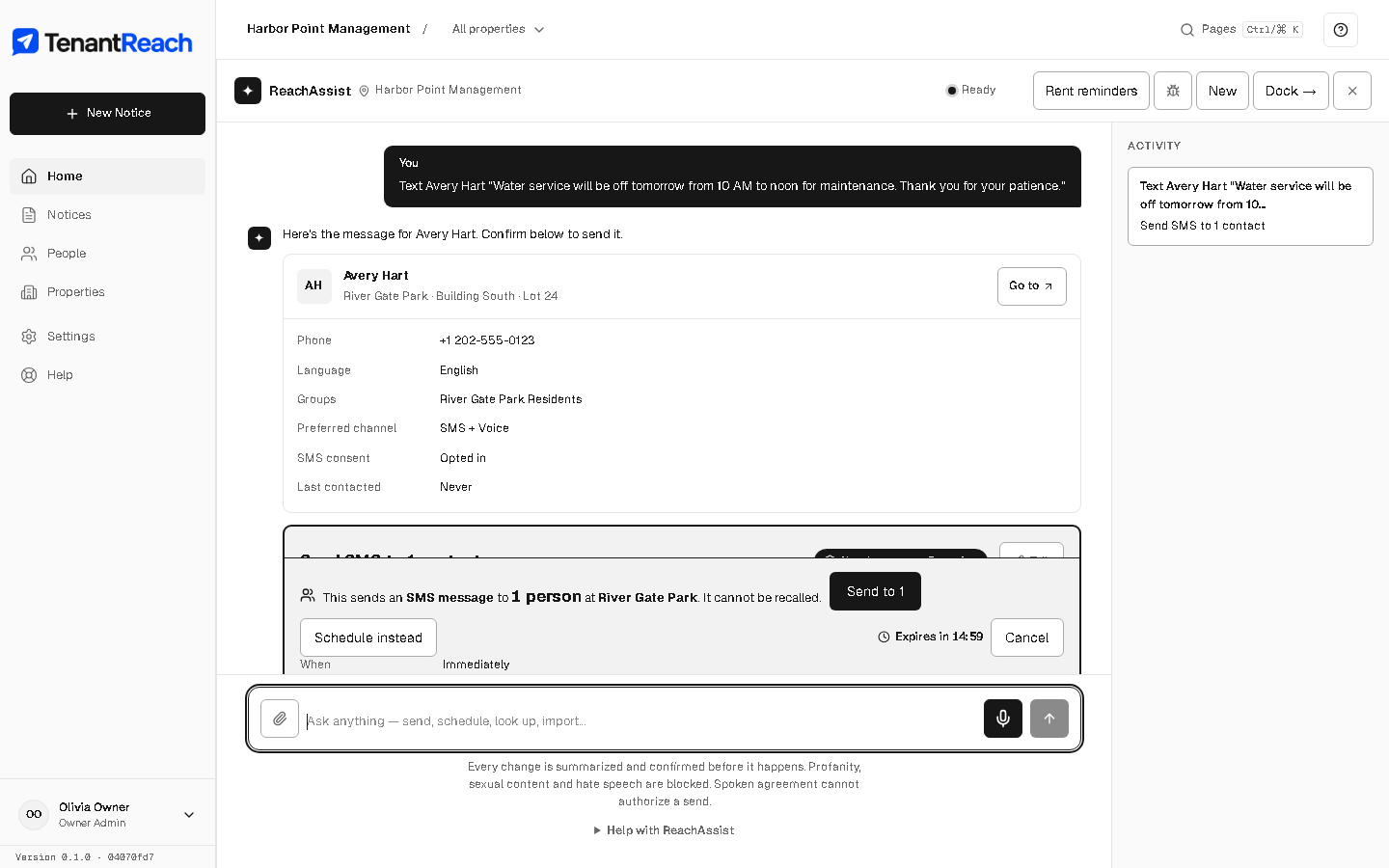
Start with a familiar maintenance update. In the demo, write your own notice, preview the Spanish translation, and hear it read aloud.
The demo opens in MercuryReach, our existing application. It is a simulation: no resident is contacted and no account is needed.
Water will be off at Maple Gardens on Friday from 10 AM to 2 PM for a line repair. Thank you for your patience.
Se cortará el agua en Maple Gardens el viernes de 10 a. m. a 2 p. m. para reparar una tubería. Gracias por su paciencia.
Illustrative message · sample property · nothing sent
Keep contact preferences, delivery history, and follow-up close to the people and properties they belong to.
Explore the Help CenterWith Automatic Message Categorization enabled, incoming messages are organized by category, so your team can find conversations that need attention and keep follow-up moving.
Opt-outs, STOP handling, and no-call or no-text states remain part of the send workflow.
Your organization’s contacts, team permissions, branding, and billing stay scoped to your workspace.
Delivery history, reply threads, and support tickets give your team somewhere to turn when a notice needs follow-up.
Match your properties, resident list, and monthly text and voice usage. Compare every allowance before you choose.
What is an SMS segment? A text is billed in parts called segments. Long messages and some characters can use more than one segment per recipient. Calls use voice minutes.
All three plans include English and Spanish delivery. Growth and Portfolio add live translation preview.
Prices are in USD. These are monthly allowances; usage beyond them has the rates below. Review your selected plan during setup.
Resident replies and team access. Shared Inbox is an optional add-on available on every plan, enabled separately from your subscription. Once enabled, teammates with inbox permissions can view and reply to resident messages; property managers see their assigned properties. Confirm add-on pricing during setup.
| Plan details | Starter | Growth | Portfolio |
|---|---|---|---|
| Monthly price (USD) | $149 | $349 | $899 |
| Properties | 3 | 12 | 40 |
| Contacts | 1,500 | 7,500 | 25,000 |
| Team members | 3 | 10 | 30 |
| SMS segments | 7,500 | 15,000 | 60,000 |
| Voice minutes | 500 | 1,200 | 5,000 |
| Per extra SMS segment | $0.04 | $0.03 | $0.02 |
| Per extra voice minute | $0.08 | $0.07 | $0.05 |
Every plan includes resident texts, voice calls, and English and Spanish delivery. Shared Inbox is enabled separately, as described above.
| Feature | Starter$149 / mo | Growth$349 / mo | Portfolio$899 / mo |
|---|---|---|---|
| Live Spanish translation preview | Not included | Included | Included |
| Your workspace branding | Not included | Included | Included |
| Priority setup support | Not included | Not included | Included |
| Data exports and API access | Not included | Not included | Included |
| Detailed reporting | Not included | Not included | Included |
Workspace branding lets your team use its own identity. Data exports provide downloadable records; API access connects data with your team’s software.
For smaller property teams sending routine texts and voice notices.
$149 / month
3 properties · 1,500 contacts
7,500 SMS segments / month
500 voice minutes / month
For teams managing several properties, previewing translations, and using their own workspace branding.
$349 / month
12 properties · 7,500 contacts
15,000 SMS segments / month
1,200 voice minutes / month
For larger portfolios that need more capacity, detailed reports, and connections to their own software.
$899 / month
40 properties · 25,000 contacts
60,000 SMS segments / month
5,000 voice minutes / month
Need more properties, contacts, or team members? Explore Enterprise setup
Plan selection opens MercuryReach account setup. Live delivery is enabled separately.
Yes. Tell ReachAssist who you want to reach and what you want to say. ReachAssist AI helps prepare your message, so you can review the audience and wording before sending.
When Automatic Message Categorization is enabled for your workspace, incoming messages are organized by category, helping your team find conversations that need attention and keep track of follow-up.
TenantReach's demo and account setup currently run in our existing MercuryReach application. You will see MercuryReach branding there. You can try the simulated demo without creating an account; live resident delivery stays off until your team completes setup.
Use text, voice, or both for maintenance updates, inspections, rent reminders, urgent property notices, and everyday community news.
Growth and Portfolio include live Spanish translation preview. English and Spanish delivery is included from Starter. You can try translation in the account-free demo before choosing a plan.
Yes. Simple mode keeps the audience, message, and send decision in focus. Additional options are available when your team needs them.
No. Setup and rehearsal stay separate from live launch. Your team can review the workflow before real texts or calls are enabled. The public demo is simulated and does not contact residents.
Yes. Organize contacts and notices by property within your workspace. Choose a plan that fits your portfolio, with workspace permissions and contact preferences carried through the workflow.
Give your team a calmer way to keep residents informed.
Start beta setupContinue in MercuryReach to set up your workspace. Rehearse before enabling live texts or calls.